
EXOTOOL
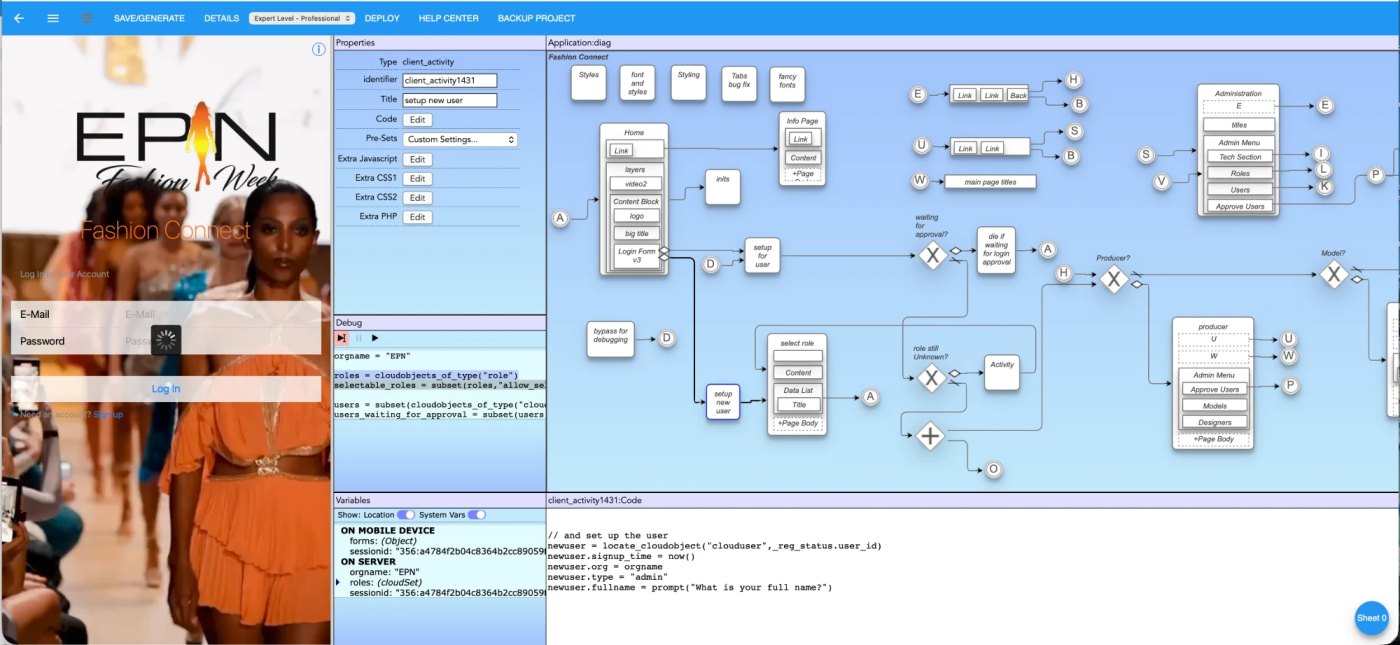
You draw the app: its screens, its data, its behavior. Exotool decides what runs on the device and what runs on the server, and connects the two. Nothing in the diagram has to say which is which.

What Exotool does, in two minutes (click to play).
Exotool automatically partitions software into server and client code, and automatically connects the parts. Data schemas are determined automatically. The user need only use the Exotool visual development system to design the App, and add behavior code using Exotool's simple pseudocode language. Exotool does the rest, instantly producing a prototype App.
Exotool enables users to design, develop, and deploy cross-functional and fully data-enabled progressive web apps (PWAs) that run on phones, tablets and desktops and install like native apps. Exotool saves time & money by allowing developers, IT workers, and entrepreneurs to build applications quickly, with less complexity, and with fewer skill requirements.
Exotool also works with Claude. Connect the Exotool connector from the Claude directory and ask Claude to build or change your app in plain words. Everything Claude makes is an ordinary Exotool diagram that you can open, read and change in the editor yourself. How it works.
How it works
Design it as a diagram
In the browser-based editor you draw the app: its screens, its navigation, its data and its behavior, written as a simple pseudocode inside the diagram. One diagram, the whole app. Or describe it to Claude and let it draw.
Exotool builds the whole stack
Exotool's patented engine decides what runs on the device and what runs on the server, generates the APIs between them and the database schema, and writes the source. Built by rule, not guessed: the same diagram gives the same app every time.
Preview now, deploy anywhere
Every save runs the app in Exotool's sandbox, at a preview address you can open on any device or share. When it is ready, take the generated source to a host of your choice. It is yours.
Read the system overview in the Help Center.
Build apps from Claude
Exotool is listed in the Claude connector directory. Connect it and ask Claude, in plain words, to build or change your apps: Claude edits the diagram, Exotool builds the app, and you get the preview address. Everything Claude makes is an ordinary Exotool diagram that you can open, read and change in the editor yourself, with every save backed up first.
Three steps
-
Open Exotool in the Claude directory
Go to claude.ai/directory/exotool and choose Connect. Or, in Claude, open Settings → Connectors → Add custom connector and paste
https://mcp.ops.exotool.com/mcp. -
Sign in with your Exotool account
A free account is enough, and every plan works with Claude. The sign-in page can create the account for you if you have none.
-
Ask Claude
For example:
Build me a simple picture database app in Exotool
Open Exotool in the Claude directory What Claude can do, and the limits
Claude building an app in Exotool, and the preview opening.
Examine exactly what was built
A written plan describes an app before it exists. Exotool's diagram is the app: every screen, every piece of data and every bit of behavior is in it, in a small language you can read, and what you see is what runs.
- AI you can audit. When Claude builds for you, what it produces is a diagram you can see, and Exotool still guarantees the build. Every save is backed up first, and secrets never pass through a conversation.
- Nothing hidden. The diagram says what the app does, not where each piece runs: Exotool works that out, so there is no client code, server code or API plumbing in the diagram for you to get wrong.
- Built by rule, not guessed. The same diagram gives the same app every time. There is no model guessing at your source.
- Source you own. Exotool gives you the generated code. Deploy it on a host of your choice, with your own database. No lock-in.
| Typical AI app builders | Exotool | |
|---|---|---|
| What describes the app | A written plan, then the code. | The diagram itself. |
| What you review | Thousands of generated lines. | One diagram. |
| How the code is made | A language model writes it; the output varies from run to run. | A patented engine builds it from your diagram, the same way every time. |
| Where the back end lives | On their platform, usually. | In Exotool's sandbox while you build, and/or on any web-capable hosting platform. |
| Lock-in | Most tie you to their hosting and their database: leave, and the app stays behind. | None. You have the code and your own database, and you run it where you want. |
| The database | Often reached from the browser with a client key; per-row rules are the only guard, and one missing rule makes a table public. | Reached only from the server side the engine generated; the browser is never given a database key. |
| Working with AI | The model is the builder. | Claude edits the diagram through the Exotool connector; Exotool builds. You see what changed. |
Features
Web-Based UI Builder
Exotool's interactive Graphical User Interface (GUI) Builder is web-based, requiring only a web browser. No software installation is needed.
Patented Engine
US Patent 12,461,721, exclusively licensed to Exotool, covers how Exotool works out and generates the APIs between the client and server parts of your app. Built by rule, not guessed.
True Platform Independence (Zero Dependency)
Exotool is truly platform independent. It generates *all* the code your app needs. There is no need to set up and configure a host or database.
YOU control your IP
Exotool lets you control who can access your App diagram, so you control your intellectual property, no matter who works on it. And Exotool provides you with the source code to your App.
Rapid Development
Changes to your mobile App are immediate, and most can be created in only a few minutes.
Customizable
Templates and presets give fine control, shared across projects and users. Developers drop in explicit JavaScript or PHP wherever they want it, and debug both ends at once: the visual debugger follows a step from the device to the server and back.
Run Anywhere
While you build, your app runs in Exotool's own sandbox with a preview address you can share. To ship, deploy the generated source on a host of your choice: you have all the code that defines your app, and no lock-in.
Data Security
The engine decides what runs on the device and what on the server, so the database is reached only from the server side: the browser never holds a database key, and there is no per-row rule to forget. Mark a value as sensitive and it never reaches the device at all.
- SAAS Web-based GUI Builder
- Multi-tier code generation
- Instant automatic back-end integration
- Multi-platform
- True Platform Independence (Zero Dependency)
- Source code generation with comments
- YOU own your app
- Rapid Start-up time
- Automatic API Generation
- Configurable / shareable styles
- Wire-framing
- Instant deployment
- Multi-user
- Highly Customizable
- Third-party collaboration and sharing (access)
- "Push" messaging
- Choice of back-end storage (single-file, heap, or MySQL)
- Data Access Security
- Users and User Management
- Automatic Refresh Logic
- Data sharing between apps
- Free plan, no credit card (a small Exotool notice on the app)
- Works with Claude (MCP)
- Live De-bugging
- Web-Based GUI Builder
- Single-diagram structure
- Instant translation / inclusion of images
- Credit Card Payments
Plans and Pricing
Already have an account? Change your plan in Exotool, under Account > My Subscription.
Start with one app, free.
No credit card. Build it in the editor, or connect Exotool to Claude and ask. The free app carries a small "Built with Exotool" notice; a paid plan removes it.